


|


To create a new CMR consignment note, sign in or sign up. Please complete all required fields. Enter a valid email address; you will receive an email with a verification link. If you do not receive the message, check your spam or junk folder. If the problem persists, contact us.
Company: your company name
Contact name: your name
Email: a valid email address
Password: must be at least 5 characters
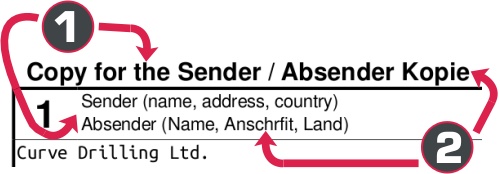
Primary language: first line of the CMR consignment note (Sender, Consignee, Carrier, etc.)
Secondary language: second line of the CMR consignment note
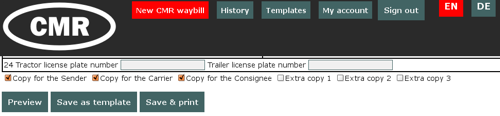
Default print layout: set the number of copies (Copy for the Sender, Copy for the Carrier, Copy for the Consignee, Extra copy 1, Extra copy 2, Extra copy 3).
You can change this later in the
My Account menu.
Phone: include the country code
Website: please enter your website address to help us improve our service.
Enter the characters shown in the image: click the refresh button
if they are not readable.
Complete the form as usual. We do not verify whether the information entered is correct or whether optional fields are left blank.
Recommended fields:
1. Sender
2. Consignee
3. Place of delivery of the goods
4. Place and date of taking over the goods
6–12. Marks, number of packages, method of packing, nature of the goods, weight
16. Carrier
21. Established in/on
24. Tractor license plate, trailer license plate
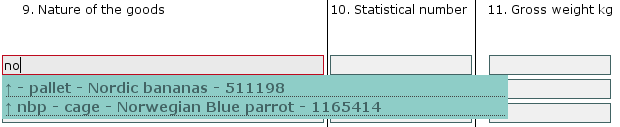
Start typing in a field. Auto-complete suggestions will appear based on similar data from previous CMR consignment notes and templates.
Click a suggestion to select it.
 → → →
→ → →
Below the form, select the copies you want to print.
– downloads a print preview in PDF format.
– saves the form as a template. You can later edit, delete, or load it as a new CMR consignment note.
– saves the data and generates a serial number. The entry can be edited later.
– downloads the CMR consignment note in PDF format.
You will then be redirected to the
History list.
Please allow pop-ups for this website. Alternatively, you can use the print option from the History list.
View your previous CMR consignment notes. Each document can be downloaded or loaded as a new CMR consignment note. Use the drop-down menus to filter by Sender, Consignee, or date.
View your saved templates. You can load a template as a new CMR consignment note, edit it, or delete it. To edit a template, click Edit, make the required changes, then click . The button downloads a print preview in PDF format.
Edit your account details. To change your password, enter a new password in the appropriate fields; otherwise, leave them blank.
Select the languages used on printed CMR consignment notes.
Set the default print layout for the copies (Copy for the Sender, Copy for the Carrier, Copy for the Consignee, Extra copy 1, Extra copy 2, Extra copy 3).
For Proof of Delivery, enter the email addresses of the consignee and the carrier.
To save your changes, click the button.